Raspberry Pi 5 kit review (db-tronic): the perfect starting point for beginners
- Test
- 8/ 10
- Rocks on Galaxy
- Maison connectee
- 06 Sep, 2026
- 254
An excellent turnkey kit for beginners, simple and complete. Its only fault is the stock SD card, which you'll swap for an NVMe SSD for heavier use.
Beginner Pi 5 kit: what's ready, what you'll upgrade
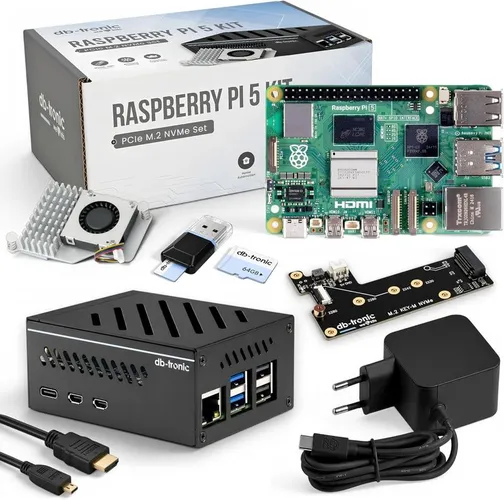
Raspberry Pi has a reputation as a brilliant tool… if you like tinkering. The db-tronic Raspberry Pi 5 4GB kit aims to remove that barrier: metal case, 27W PSU, active cooling and storage already in the box. Here's our beginner-eyed review — no unnecessary jargon.
Who it's for
Ideal if you want a small home server (media, smart home) without hunting fifteen Amazon SKUs. Less ideal if you already know bare Pis and SSDs: you're mostly paying for pack convenience. For a first Pi, this kit avoids the classic « I forgot a proper PSU » mistake.
Surprisingly simple assembly
Everything goes together without special tools in a few minutes, even if you've never touched a Pi. The metal case and active cooling are included: plug in the 27W supply, insert the card, done. For beginners, that's the brief: turnkey, zero prior knowledge.
What we run day to day
Two uses stuck immediately: Jellyfin for movies and shows on every screen, and Home Assistant to centralize smart devices. Both install cleanly and run stably on the Pi 5; 4GB of RAM is plenty for that pair.
The micro-HDMI 4K output is mostly for first setup; afterward the Pi lives headless on the network. That's when the kit earns its keep: once on the shelf, you forget it.
| Part | db-tronic kit | Rocks tip |
|---|---|---|
| SoC / RAM | Pi 5 / 4GB | Fine for light Jellyfin + HA |
| Included storage | 64GB microSD | Replace for 24/7 duty |
| Power | 27W | OK for Pi 5 + SSD |
| Case | Metal + fan | Acceptable in a closet |
| SSD slot | M.2 NVMe PCIe | Upgrade #1 |
The kit removes first-Pi friction: the real project afterward is storage, not assembly.
The weak point: the SD card
Only real knock: the 64GB SD card. It boots the system, but stays slower and less reliable than an SSD for a 24/7 server. Card corruption after months of heavy writes is a Pi classic. Plan ahead.
The upgrade that changes everything: NVMe SSD
We added an NVMe SSD (M.2) in place of the SD. Result: faster boot, smoother I/O, peace of mind for always-on use. The Pi 5 has the M.2 slot; install takes minutes. Modest SSD spend for a big reliability win.
After 2 weeks of use
Fifteen days of continuous Jellyfin + Home Assistant: no crashes, temps under control thanks to the fan, stable network. The stock SD was enough to validate the setup, but media indexing slowdowns confirmed the NVMe plan. By week two the Pi was « invisible » — the best compliment for a home server.
Nothing contradicted the verdict: excellent starting point; swap the SD as soon as usage gets serious.
Verdict
To start with Raspberry Pi, this kit is an excellent pick: simple, complete and upgradable. We only ding the stock SD — happily replaced with NVMe for heavier use. 8/10.
🛒 See the Raspberry Pi 5 kit on Amazon
Strengths and trade-offs
What actually sticks: Very simple assembly and setup, perfect for beginners ; Complete kit: metal case, 27W power supply, active cooling ; Jellyfin and Home Assistant installed without hassle ; Raspberry Pi 5: 4GB RAM, micro-HDMI 4K output, M.2 NVMe slot.
What you have to live with: Ships with a 64GB SD card (slower and less reliable than an SSD) ; NVMe SSD must be added separately for heavy server use. These aren't hidden footnotes — know them before you buy.
We're not hunting a perfect product: we're hunting the right compromise for a specific use. The lists above exist for that.
One last practical note: keep a record of your setup (firmware versions, accessories, settings). When something breaks three months later, those notes save real time — and stop you from reinstalling blind. They're also useful for comparing a future update against the behavior we saw in this review.
Specs
- Model
- Raspberry Pi 5
- RAM
- 4 GB
- Included storage
- 64 GB microSD card
- Power supply
- 27 W
- Case
- Metal + active cooling
- Video output
- Micro HDMI 4K
- SSD slot
- M.2 NVMe PCIe
An excellent turnkey kit for beginners, simple and complete. Its only fault is the stock SD card, which you'll swap for an NVMe SSD for heavier use.
Pros
- Very simple assembly and setup, perfect for beginners
- Complete kit: metal case, 27W power supply, active cooling
- Jellyfin and Home Assistant installed without hassle
- Raspberry Pi 5: 4GB RAM, micro-HDMI 4K output, M.2 NVMe slot
Cons
- Ships with a 64GB SD card (slower and less reliable than an SSD)
- NVMe SSD must be added separately for heavy server use